
From Competitor Video to Content Brief in One Sitting

Turn one competitor video into an approvable content brief: capture public evidence, separate guesses from facts, and get a named human sign-off before drafting.

On this page
#The handoff that breaks content programs
A competitor publishes a video. Someone drops the link into a shared doc with the words "we should do something like this." Three days later a writer opens the doc and asks the only reasonable question a content brief should already have answered: what exactly are we making?
That gap between a link and a brief is where most content programs lose their shape. The video is not the brief. A summary of the video is not the brief either. A content brief is the artifact that turns a public observation into a decision: what we will make, for whom, on what evidence, and what we will refuse to claim.
The good news is that this does not require a long meeting. With a fixed structure and a named reviewer, you can turn one competitor video into an approvable content brief in one sitting. The bad news is that the structure has to be followed. Skip the evidence column and you are not writing a brief. You are writing a wish with bullet points.
#What a content brief is actually for
A brief has three jobs, and they are more operational than creative:
- A writer can start work without asking basic questions.
- An editor can reject it for a stated reason.
- A reviewer can sign off on it in one sitting, before the draft exists.
If any of those fail, the brief is decoration. A brief that says "write about competitor tracking" fails all three. A brief that says "help a five-person SaaS marketing team compare two competitor-tracking methods using public data, with a worked quota example and an explicit limit on what public views can prove" passes them.
Notice the second example is narrower. Narrow is good. A brief should reduce the number of decisions a writer has to make, not increase them. That is why the output of this process is one page and one question, never a list of twelve topics inspired by one video.
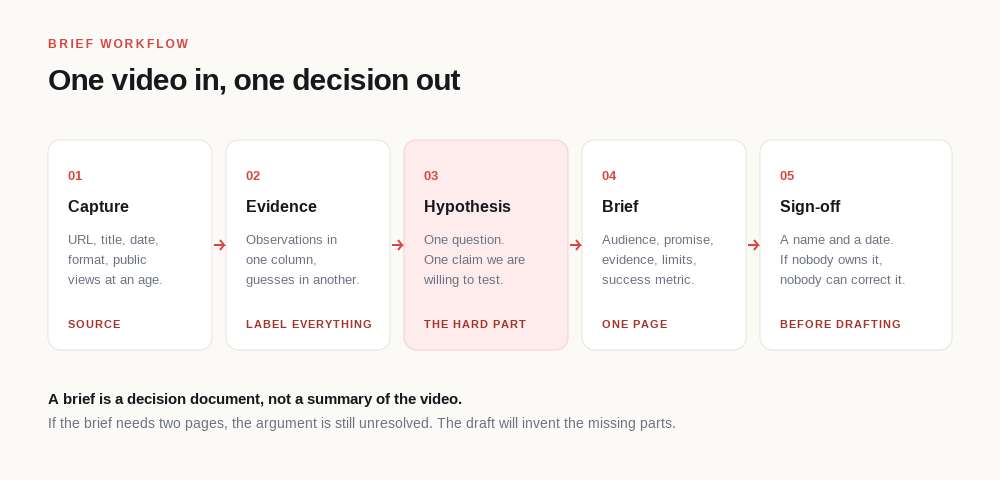
One video in, one decision out. The brief is a decision document, not a summary.
#Step 1: Capture the public record
Open the video and record only what is publicly there:
| Field | Example |
|---|---|
| URL | The canonical video link |
| Title and publish time | Exact timestamp, not "last Tuesday" |
| Format and length | Interview, tutorial, demo, short |
| Public views at a recorded age | 3,100 views at 48 hours, observed 12 March 14:00 |
| The question the title promises | "How do I set up a tracker without an API?" |
| Public follow-ups | Description links, playlists, pinned comment |
YouTube's Data API documents the fields an outside observer can legitimately read. Use them. What you cannot read is the competitor's impressions, click-through rate, retention, or traffic sources. Those require the channel owner's authorization through the YouTube Analytics API.
This is not a small legal distinction. It determines the language your brief is allowed to use. "They published three setup videos in six weeks" is an observation. "They are winning on setup" is a story you are telling about a number you cannot see.
#Step 2: Put observations and guesses in different columns
This is the step teams skip, and it is the step that pays for the whole exercise. Use two columns.
| Observation (public, checkable) | Hypothesis (our guess, unverified) |
|---|---|
| Published 3 setup videos in 6 weeks | Setup may be a bigger part of their sales motion |
| Description links to a migration guide | They may want viewers to continue into implementation |
| Public views at 48h are 2.3× their median | Something changed in topic, packaging, or distribution |
Every row on the left can be checked by opening the video. Every row on the right is a guess until your own data says otherwise. The spreadsheet is not a place to blend them; it is a place to keep them apart.
We think the discipline matters more than the tooling. A team using a plain spreadsheet with an "unverified" column will produce better briefs than a team using an expensive dashboard that outputs a single confidence score with no visible inputs.
#Step 3: Choose one question, then one hypothesis
A competitor video can suggest dozens of questions. Pick one. The test is whether your audience is already asking it and whether you can add something the video did not provide.
For example, a setup tutorial that outperforms its channel's median might suggest:
- What prerequisites does the viewer need before setup?
- What happens when the setup fails?
- Which of two setup approaches should a small team choose?
- How do you keep the setup current after an interface change?
All four are plausible. Only one belongs in this brief. Choose it based on your own calls, support themes, or search queries — not on which one sounds most productive. If you have no evidence your buyers ask any of them, the honest decision is to stop here and go back to research. Our guide to content gaps covers that validation pass.
Then write the hypothesis in one sentence: "Operations leads at mid-market SaaS companies need a setup checklist with failure paths, and current public material gives them the happy path only." One sentence. If it takes two, the question is still fuzzy.
#Check the baseline before you promote a video
A video does not become important because it has a big number. Compare it with six to ten recent uploads from the same channel, in the same format, at a comparable age. Use the median. A departure at two times the median is worth investigating; a lifetime view count is not.
The first-48-hours guide walks through the arithmetic and the five explanations that can produce a spike. If the video is not actually a departure, you can still write a brief — but do not claim it was a breakout to justify the topic.
#Step 4: Fill the one-page brief
The template is fixed. Nine fields, one page:
| Field | What goes in it |
|---|---|
| Audience | Who this is for and the decision they are making |
| Question | The one question the piece answers |
| Promise | What they can do afterward |
| Thesis | The argument in one sentence |
| Evidence | Sources, examples, numbers, and the limit of each |
| What we will not claim | The boundary that prevents an unsupported promise |
| Original insight | The example, test, or teardown that is ours |
| Next step | One relevant resource or action, if any |
| Success metric and reviewer | One measurable signal, one name, one date |
Here is a filled example for a fictional team:
Audience: Operations managers evaluating an approval workflow. Question: What should be decided before automating approvals? Promise: Leave with a checklist of decision rights, exception paths, and audit needs. Thesis: Automation fails on exceptions, not on happy-path approvals. Evidence: A product specialist validates the workflow; current documentation is linked; three support themes describe exception handling. What we will not claim: That automation reduces cycle time for every organization. Original insight: An annotated failure-path diagram built from the product's own validation steps. Next step: The implementation guide, linked after the answer. Success metric and reviewer: Qualified demo requests from the page; Jean Cope, 15 April.
That is a brief a writer can start from and an editor can argue with. It is also fictional — a template, not a customer result. A real brief names internal sources and records who verified them.
The original insight field deserves extra attention. If it stays blank, the piece will be a summary of other people's material with your logo on it. An insight does not have to be a huge study. It can be a worked example, a failure mode, a transparent test, or a defensible opinion with the evidence separated from the opinion.
#Step 5: Get a human sign-off before drafting
Approval is not a nod in a Slack thread. It is a named person reading the brief and confirming four things:
- The audience and question are specific enough to write against.
- The evidence is real and the limits are stated.
- The angle is ours, not a repackaging of the source video.
- The success metric is something we can actually observe.
Record the name and the date in the brief itself. In our workflow, a brief is only ready when every required field is complete, at least three public sources are attached, two internal links are planned, and a named editor has approved it. The draft does not start until then.
In our experience, the most useful part of sign-off is rejection. "This brief does not say what we will not claim" is a cheap fix at the brief stage and an expensive rewrite at the draft stage. A reviewer who can reject a brief in five minutes is doing more for quality than one who compliments the finished draft.
#Five ways this goes wrong
The summary brief. It retells the video in six bullets and calls that an outline. Fix: if every sentence could be copied from the source, there is no brief.
Invented demand. "The video got 40,000 views, so buyers care." A view is a distribution outcome. Fix: require a second signal from your own calls, support, or search data.
No stated limits. The brief promises a result the evidence cannot support. Fix: fill the "what we will not claim" field before the evidence field.
Six questions in one brief. The writer produces six shallow sections. Fix: one question, one thesis, one piece.
No owner. Nobody is accountable for the claims. Fix: a name and a date, or no draft.
#FAQ
#What is a content brief?
A one-page decision document that tells a writer who the piece is for, what question it answers, what evidence supports the answer, what it will not claim, and who approved it. It is not a summary of a source video or a list of headings. A good brief lets a writer start without asking basic questions.
#How long should a content brief be?
One page. If it takes more, the argument is unresolved and the draft will invent the missing parts. Nine fields — audience, question, promise, thesis, evidence, limits, insight, next step, and reviewer — are usually enough. Add length only when a source genuinely needs a caveat.
#Can I turn a competitor video into a brief without paid tools?
Yes. Public titles, descriptions, dates, and view counts are enough to capture the record. A spreadsheet, a consistent snapshot habit, and your own customer evidence do the rest. Paid tools help with volume and freshness; they do not supply the judgment that makes a brief approveable. If you are weighing a specific vendor, the evaluation guide includes a 60-minute pilot.
#What should a content brief not claim?
Anything the evidence cannot support: private competitor analytics, guaranteed outcomes, universal benchmarks from a handful of channels, or demand inferred solely from a view count. If a claim needs a number you cannot see, label it a hypothesis or remove it.
#Who should approve a content brief?
A named person who can read the final draft and stand behind its claims. In our process that is the editor, recorded with a review date. Approval happens before drafting, so the writer is not guessing what "good" means. An unowned brief is a draft waiting for an argument.
The point of this workflow is not to produce more documents. It is to make sure that when a writer opens a brief, the thinking has already been done — and when a reader opens the article, the evidence is still there.
Sources
- YouTube Data API: video resource
Documents the public video fields available for the capture step.
- YouTube Analytics API: reports.query
Shows why private channel metrics cannot appear in an external brief.
- Google Search Console: Performance report
One source of independent demand evidence for the hypothesis step.
- Google Search Central: Creating helpful, reliable, people-first content
Supports the limit that a brief must help a reader, not just fill a calendar.
Written and reviewed by Jean Cope for the ChannelWhisper editorial team. We may mention our own product in articles. Read our research method, disclosure, and corrections policy.
Ready to turn research into pipeline?
ChannelWhisper monitors competitor channels and generates ready-to-record briefs.
Keep reading
AI Content Checklist: 12 Checks Before You Publish
A printable AI content checklist of twelve checks in four groups, with a one-minute test and a definition of good for each one.
How to Refresh Old Content Without Rewriting It
A decision tree for old pages: keep, update, merge, rewrite in place, or retire — with the history and URLs worth preserving.
Topic Clusters for Small Content Teams
A pillar, six supporting articles, one intent per URL: how a two-person team builds topic clusters that actually get published.