
How to Refresh Old Content Without Rewriting It

A decision tree for old pages: keep, update, merge, rewrite in place, or retire — with the history and URLs worth preserving.

On this page
#The page is old, but that is not the problem
An article from 2022 still ranks. It also describes an interface that changed eighteen months ago, links to a help page that moved, and answers half the question the reader actually has. Someone proposes a "refresh," which in practice means changing the date and swapping one screenshot. It is the kind of page a content refresh is meant to fix.
The word "refresh" gets used for a date change, but a content refresh is a bigger decision. It is a decision about what the page is for now: keep it, update it, merge it into a better page, rewrite it in place, or retire it. The date is the least important field.
This guide gives you a decision tree, four levels of update, and a worked example from our own library. It is biased toward keeping URLs that still earn trust and toward being honest when a page should disappear. Google's helpful content guidance is the standard: a page should still help a reader after the update, not merely look newer.
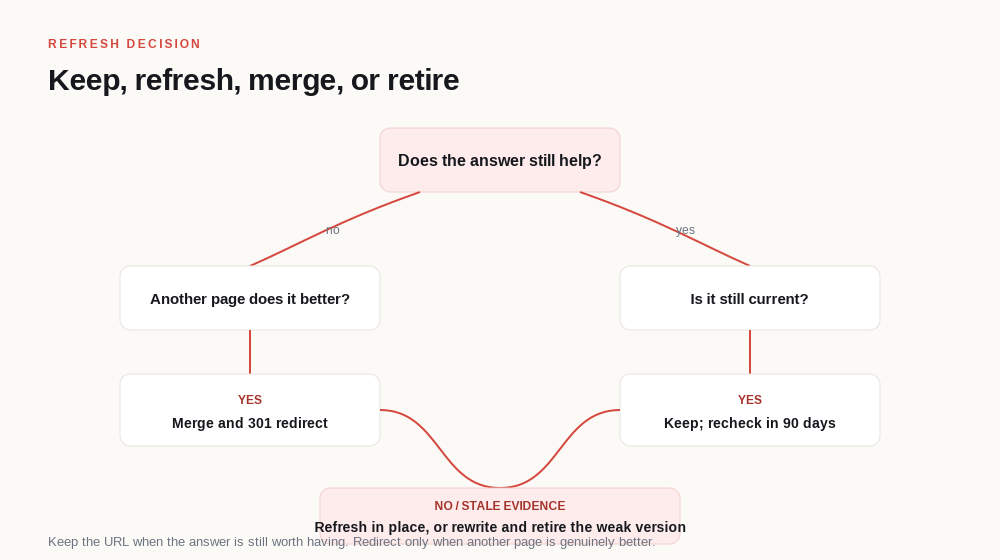
Keep the URL when the answer is still worth having. Redirect only when another page is genuinely better.
#What a content refresh actually means
A refresh starts with two questions:
- Does this page still answer a question someone asks?
- Is the answer still current and materially useful?
If both are yes, keep it and check again later. If the answer is useful but stale, update it. If another page answers the same question better, merge and redirect. If the question is still worth answering but the page is thin, rewrite it at the same URL. If neither the question nor the answer matters anymore, retire it.
Notice that "the page is old" is not on the list. Age is a prompt to look, not a reason to act. A five-year-old explanation of a stable concept may be the best page on your site. A six-month-old comparison built on a product launch may already be wrong.
#Five signs a page needs attention
- Outdated specifics. Screenshots, prices, policies, or interface names no longer match reality.
- Declining performance with stable demand. Search Console shows impressions holding while clicks fall — your listing is losing its appeal.
- The product changed. The page describes a workflow the product no longer supports.
- The answer is threadbare. It defines the topic but never reaches the decision the reader came for.
- Cannibalization. Two of your pages answer the same question and neither is definitive.
The fifth sign is the one teams miss. A page can be individually fine and still be the weaker half of a duplicate pair. Our topic cluster guide covers the rules for merging pages that fight over one intent.
#Four levels of refresh
A content refresh has four levels, from a link fix to a full rebuild.
1. Touch-up. Fix broken links, stale dates, a dead screenshot, or a typo in a product name. No new argument. Log the change and move on.
2. Substantive update. Add the section readers keep asking for: a failure mode, a worked example, a decision table, a source that did not exist when the piece was written. The original argument stays; the answer gets deeper.
3. Merge. When another page answers the same question better, move the unique material into the stronger page and redirect the weaker URL. Keep the canonical URL that already has trust. Our consolidated evaluation guide exists because three overlapping comparison pages were splitting the same intent.
4. Rewrite in place. The URL and the question survive; the argument is rebuilt from scratch. This is what you do when the page is thin but the topic is worth owning. Preserve the URL, preserve the revision history, and write the new brief before the new draft.
A retire is a fifth outcome, not a failure. A page that no longer helps anyone is a liability: it can confuse readers, dilute a topic, and become the first result someone finds when they want to judge your expertise.
#Preserve the history
A refresh that overwrites the old version destroys the evidence trail. Keep three things:
- The URL, if the page still earns trust. Redirects should be a last resort, not the default.
- A revision snapshot of the old content, with a date. A correction policy is only credible if you can show what changed.
- A short change log in the brief or CMS record: what changed, why, who approved it, and when the next review is due.
Our editorial policy and corrections page set the standard for readers. The change log is how a small team actually meets it. If you change a factual claim, record the source that prompted the change.
#A worked example from our own library
We ran this process on our blog and found eleven posts. Five were under 950 words, several restated the same three ideas with different titles, and three comparison pages competed for one intent.
The response was not one uniform "refresh." We retired three off-topic posts and redirected them, consolidated the three comparisons into one canonical evaluation guide, and rewrote the five thin survivors in place at their existing URLs. Each rewritten post gained sources, FAQs, an original diagram, a named reviewer, and a review date. The URLs stayed; the arguments changed.
For example, a seven-hundred-word post about public competitor research became a six-pass channel audit with a one-page teardown template. The question was still worth answering. The original answer simply stopped at "collect public signals" and never told a reader what to do with them.
In our experience, this is the normal shape of a refresh project. A handful of pages need a real rewrite, a few need merging, and the rest need a source link or a corrected screenshot. Treating all of them as "update the date" wastes the opportunity.
#The 90-day rhythm
Give each published piece a review date. At 48 hours and seven days, you are checking packaging and early response. At 28 days, you are checking whether it is being found. At 90 days, you make the content decision:
| Outcome | When to choose it |
|---|---|
| Keep | Still accurate, still useful, no duplicate |
| Refresh | Useful answer, stale specifics |
| Merge | Another page answers the same intent better |
| Rewrite | Good question, thin or unsupportable answer |
| Retire | Neither the question nor the answer still matters |
Write the decision and the reason in the change log. A log turns a one-off cleanup into a habit, and it stops the same weak page from being "rediscovered" every quarter by a well-meaning editor.
#Five ways refreshes go wrong
Changing only the date. We think this is the most common failure. It signals freshness without delivering it. Readers notice, and so do search engines.
Rewriting a page that should be retired. A better version of a question nobody asks is still nobody's answer.
Redirecting a healthy URL. If the page still earns trust, keep it. Redirects are for duplicates and genuinely obsolete pages.
Dropping the revision history. Then you cannot explain what changed or when. That matters when someone challenges a claim.
Refreshing on a fixed calendar instead of evidence. A page tied to a product change may need a refresh in month two; a stable explainer may need none in two years. Let the review signal decide.
#FAQ
#What is a content refresh?
A deliberate decision to keep, update, merge, rewrite, or retire an existing page based on whether it still answers a real question accurately. It is not the same as changing the publication date or adding a sentence.
#When should I refresh rather than rewrite?
Refresh when the argument is sound but the specifics are stale — an old screenshot, a moved link, a missing example. Rewrite when the question is worth owning but the page never developed a real answer. If another page already answers it better, merge and redirect.
#Should I keep the same URL?
Yes, when the page still earns trust and the question has not changed. The URL is an asset. Redirect only when another page is genuinely better or the topic no longer belongs on the site.
#How often should content be reviewed?
Use a 48-hour, 7-day, 28-day, and 90-day cadence for new pieces, then a quarterly portfolio review. Anything tied to a product, interface, or policy should be checked whenever that thing changes, regardless of the calendar.
#How do I know whether a page is cannibalizing another?
If two pages target the same search intent — not merely similar keywords — check Search Console for overlapping queries and read both pages side by side. If a reader could not explain which one to use, merge them and redirect the weaker one.
A content refresh is not cosmetic maintenance. It is the point where a library decides what it still believes. Keep the URLs that deserve trust, retire the ones that do not, and record why you decided either way.
Sources
- Google Search Central: Creating helpful, reliable, people-first content
External standard that a refreshed page must still help a reader.
- Google Search Console: Performance report
Used to spot declining clicks with stable impressions and overlapping queries.
- Google Search Central: FAQ structured data
Relevant when a substantive refresh adds editorially approved FAQ answers.
Written and reviewed by Jean Cope for the ChannelWhisper editorial team. We may mention our own product in articles. Read our research method, disclosure, and corrections policy.
Ready to turn research into pipeline?
ChannelWhisper monitors competitor channels and generates ready-to-record briefs.
Keep reading
AI Content Checklist: 12 Checks Before You Publish
A printable AI content checklist of twelve checks in four groups, with a one-minute test and a definition of good for each one.
Topic Clusters for Small Content Teams
A pillar, six supporting articles, one intent per URL: how a two-person team builds topic clusters that actually get published.
How to Write a Content Brief That Writers Actually Use
A nine-field content brief template that fits on one page, plus the approval step that turns it into a contract instead of a form.