
How to Write a Content Brief That Writers Actually Use

A nine-field content brief template that fits on one page, plus the approval step that turns it into a contract instead of a form.

On this page
#The template that gets ignored
Most content brief templates fail for the same reason: they were designed for the person assigning the work, not the person doing it. The template has forty fields, a keyword density target, and a "tone" dropdown with eleven options. The writer fills it in because they have to, then ignores it completely.
A brief that writers actually use is shorter. It answers nine questions, fits on one page, and ends with a name and a date. It does not try to control word choice. It makes the argument explicit so the writer can spend their time on the parts that require judgment.
This guide gives you the template, the rules for filling it, and the approval step that makes it a contract rather than a form. If your briefs currently get skimmed and forgotten, the problem is almost certainly the template.
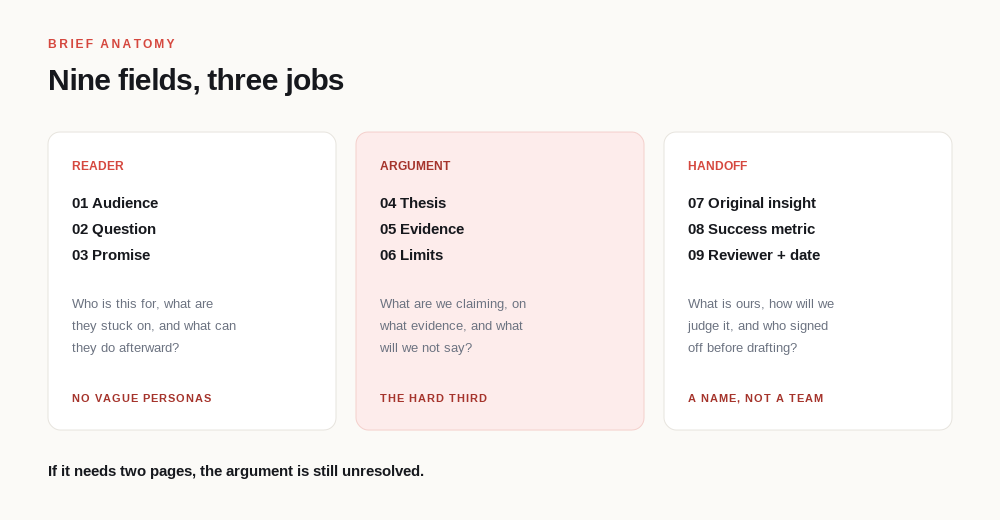
Nine fields, three jobs. If it needs two pages, the argument is not settled yet.
#What a content brief template needs
The nine fields fall into three groups. Each group does one job.
Reader: audience, question, promise. Argument: thesis, evidence, limits. Handoff: original insight, success metric, reviewer and date.
That order matters. A writer needs to know who they are writing for before they care about the evidence. An editor needs to see the limits before they approve the claim. A reviewer needs the success metric and a name at the end, because those are what make the piece accountable after publication.
Our editorial policy says the same thing at the site level: a byline means responsibility for claims. The brief is where that responsibility starts.
#The nine fields, with examples
#1. Audience
Not "marketing leaders." Name a person, a moment, and a decision.
Operations leads at mid-market SaaS companies who have just been burned by a slow migration and must defend a new timeline to finance.
If the sentence could describe half your market, it is too broad. The writer needs to know whose problem they are solving.
#2. Question
The one question the piece answers, in the reader's words.
What should we check before migrating an approval workflow?
One question. If you have four, you have four articles pretending to be one. Search Console shows the queries your own site appeared for, which is one way to choose; our content gap method covers the rest.
#3. Promise
What the reader can do after finishing that they could not do before.
Leave with a checklist of decision rights, exception paths, and audit requirements they can take into a planning meeting.
Notice this is an action, not a feeling. "Understand migration better" is not a promise a writer can aim at.
#4. Thesis
The argument in one sentence.
Automation fails on exceptions, not on happy-path approvals.
If the thesis takes two sentences, the angle is still fuzzy. That is useful information: it means the research is not done.
#5. Evidence
List the sources, examples, and numbers the draft will use — and the limit of each.
Product specialist validation of the workflow; current internal documentation; three support themes about exception handling. Limit: no cycle-time claim without a measured sample.
Evidence is not a list of links. It is a list of what each link is allowed to support.
#6. Limits
What the reader should not conclude. This is the field teams skip most often and regret most often.
The article does not promise that automation reduces cycle time for every organization.
Write the limit before the draft exists. Once a confident sentence is in the article, removing it feels like losing something.
#7. Original insight
The thing that is yours: a worked example, a teardown, a test, or a defensible opinion with the evidence kept separate.
An annotated failure-path diagram built from the product's own validation steps.
If this field stays blank, the piece will be a summary of other people's material with your logo on it. A blank insight field is a stop signal, not a minor omission.
#8. Success metric
One thing you can actually observe.
Qualified demo requests from the checklist link; reviewed at 28 days.
Do not write "brand awareness" here. Define the signal and the date, or the field is decoration.
#9. Reviewer and date
A named person and the day they approved the brief.
Jean Cope, 19 November 2026.
"Editorial team" is not a name. A team cannot be asked to correct a claim six months later. The reviewer is accountable for the argument, and that accountability starts here, before drafting.
#The approval step
A completed brief is not automatically approved. Approval is a separate human act with two possible outcomes.
Approve when the argument is clear, the evidence is real, the limits are stated, and the insight is yours. Google's helpful content guidance is a useful reminder that the piece must help a reader, not fill a slot.
Reject with a reason when any field is vague. For example, "this does not say what we will not claim" is a useful rejection. "Looks good" from the person who wrote the brief is not approval; it is an opinion from someone with the pen.
We think rejection is the most valuable part of the process. A five-minute argument at the brief stage replaces a two-hour rewrite at the draft stage. Our quality control guide covers the checks that run later; the brief is where the expensive mistakes get caught.
#Validate the fields before asking a human
Check the mechanical parts automatically so the reviewer can spend their time on the argument:
- Every field is filled in.
- At least three sources have public URLs.
- At least two internal links are planned.
- The outline has four or more headings.
- A reviewer name and approval date exist.
This is box-ticking, and that is fine — as long as the human knows the boxes are already ticked and is being asked to judge the idea. A reviewer who spends their time checking URLs will stop checking the argument.
#Keep the brief with the article
A brief that lives in a chat thread disappears. Store it with the published piece: in the CMS record, in a sidecar file, or in a versioned document. Three reasons:
- A new writer can see the original argument when they take over a refresh.
- A reviewer can defend a claim by showing what was approved and when.
- The next brief in the series can link to this one instead of reinventing it.
Our content operations guide treats the brief as the first gate in a seven-stage pipeline. The stored brief is what makes that gate auditable.
#Five ways a template fails
Too many fields. Forty fields guarantee box-ticking, not thought. Cut until it fits on one page.
No limits field. In our experience, this is the most common failure. Without "what we will not claim," every draft drifts toward an unsupported promise.
No reviewer name. A team-owned brief is an unowned brief. Use a name and a date.
Written after the draft. Then it is a description of what happened, not a decision about what should. Write it first.
Never revisited. A refresh without the original brief produces a different article with the same URL. Pull the brief out and check whether the argument still holds.
#FAQ
#What is a content brief template?
A one-page structure that a writer and editor agree on before drafting. It captures the reader, the question, the promise, the thesis, the evidence, the limits, the original insight, the success metric, and a named reviewer. It is a decision document, not an outline.
#How long should a content brief be?
One page, nine fields. If it takes more, the argument is unresolved and the writer will invent the missing parts. Add length only for a source that genuinely needs a caveat.
#Who should approve a content brief?
A named person who can read the final draft and stand behind its claims. The approval happens before drafting, so the writer is not guessing what "good" means. A team name is not an approver.
#What should a content brief not include?
Keyword density targets, eleven tone options, and a list of competing articles to imitate. It should also not include claims the evidence cannot support — that belongs in the limits field as something to avoid.
#Can I use the same template for videos and articles?
Yes, with a different next step and success metric. The nine fields are format-neutral; the format changes what "the reader can do afterward" looks like. Our video-to-brief workflow applies the same fields to a single source video.
The template is not the valuable part. The valuable part is the argument it forces you to settle before anyone writes. Keep the form short and make the conversation hard.
Sources
- Google Search Central: Creating helpful, reliable, people-first content
External standard for whether a page helps the reader.
- Google Search Console: Performance report
A first-party signal that can inform the question field.
- Google Search Central: FAQ structured data
Documents markup for editorially approved FAQ answers.
Written and reviewed by Jean Cope for the ChannelWhisper editorial team. We may mention our own product in articles. Read our research method, disclosure, and corrections policy.
Ready to turn research into pipeline?
ChannelWhisper monitors competitor channels and generates ready-to-record briefs.
Keep reading
AI Content Checklist: 12 Checks Before You Publish
A printable AI content checklist of twelve checks in four groups, with a one-minute test and a definition of good for each one.
How to Refresh Old Content Without Rewriting It
A decision tree for old pages: keep, update, merge, rewrite in place, or retire — with the history and URLs worth preserving.
Topic Clusters for Small Content Teams
A pillar, six supporting articles, one intent per URL: how a two-person team builds topic clusters that actually get published.