
The Complete Guide to YouTube Competitor Analysis for B2B SaaS

A six-step method for turning public competitor channels into content decisions you can defend: what you can see, what you cannot, and how to score the difference.

On this page
#The spreadsheet that promised everything
Somewhere in every content team's drive is a file called competitor-analysis-final-v4.xlsx. For a B2B team, it is supposed to be the whole of our YouTube competitor analysis: a tab for channels, a tab for keywords, and a tab labeled "insights" that contains the phrase "they are winning on thought leadership." Nobody can explain what that means, but everybody copies it into the next deck.
The spreadsheet is not wrong. It simply never answers the question the team actually has: what should we make next, and why should anyone believe us? YouTube competitor analysis, done well, is not a larger spreadsheet and not a prettier dashboard. It is a discipline for turning public observations into labeled evidence and a decision a human can defend.
We sell a tool in this category, which is exactly why this guide starts with the limits. A method that only works after you buy something is not a method. It is a sales pitch with a table of contents.
#What YouTube competitor analysis can actually see
There are three rows of evidence, and they are not interchangeable.
| Row | What it contains | Who can read it |
|---|---|---|
| Public video data | Titles, descriptions, publish dates, durations, thumbnails, public views, likes, comments | Anyone |
| Authorized channel analytics | Impressions, click-through rate, watch time, retention, traffic sources | The channel owner or someone they authorize |
| Your business data | Calls, support themes, qualified actions, pipeline | Your team |
YouTube's Data API documents the public fields. It is a genuinely useful dataset: what a competitor published, when, how often, in which format, and which older videos keep collecting views. What it does not contain is the second row. Impressions, retention, and traffic sources live in YouTube Analytics reports, and those require the channel owner's authorization.
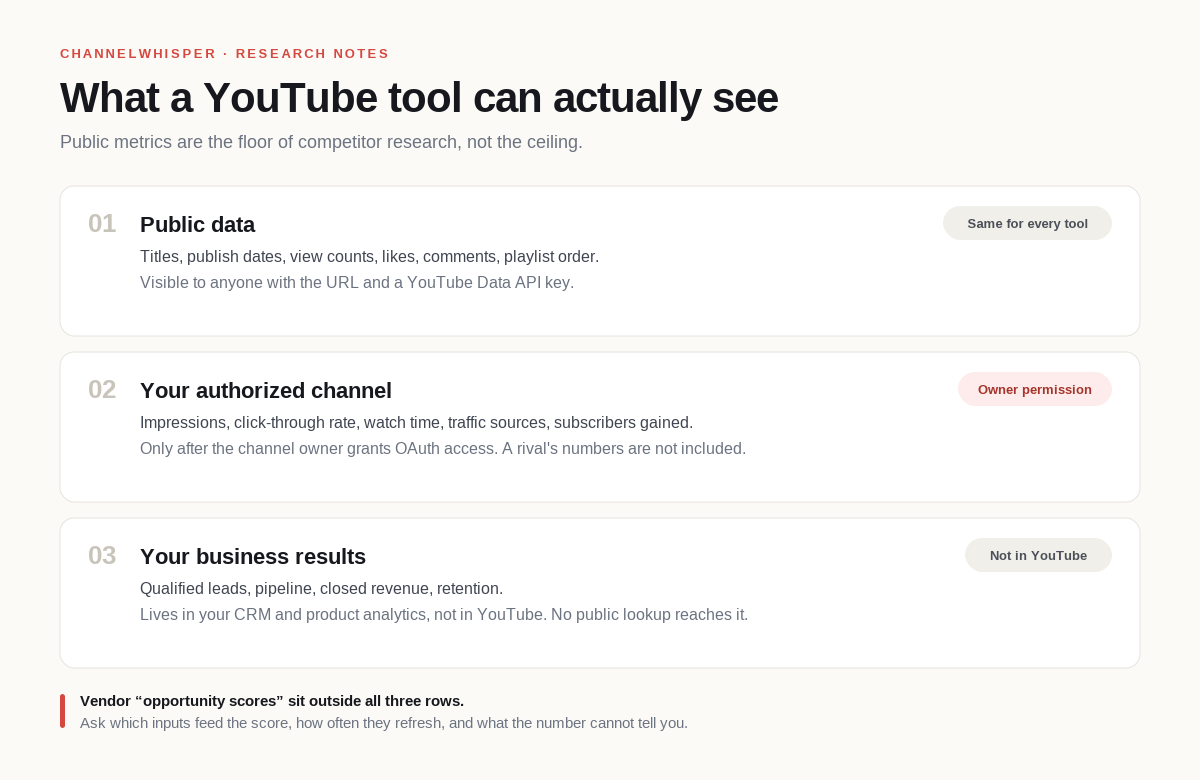
The provenance ladder. Any recommendation that cannot be traced to one of these rows is an estimate wearing a suit.
A tool can blend rows two and three with its own models, and blended estimates can be useful. But a vendor cannot read a rival's private analytics through a public lookup. If a score uses a number you cannot trace to a row, treat it as a forecast, not a finding.
The design of a tool also reveals how fresh its numbers can be. The Data API quota allows 10,000 units per day by default. Reading a channel's uploads playlist costs 1 unit; running a keyword search costs 100. Tools built around searches refresh slowly because they have to. Tools built around channels can afford to notice new uploads quickly. If you want the full comparison, the evaluation guide includes the arithmetic and a 60-minute pilot.
#Step 1: Start with a decision, not a dashboard
"Analyze the competitors" is not a task. It is an activity with no finish line, like "do research." The output is a folder of screenshots and a gradual sense that everyone else is ahead. The first rule of a YouTube competitor analysis is to name the decision before you open a tab.
Write one decision at the top of the document:
- For example: should we publish an implementation guide about data migration next quarter?
- Should we stop producing webinars and move that budget into short tutorials?
- Which buyer question deserves the next three weeks of production time?
A decision names the choice, the person who owns it, and the date it will be made. Then add one more sentence: what evidence would change your mind? If you cannot answer that, you are not doing analysis. You are collecting support for a decision you already made.
#Step 2: Choose channels for a stated reason
Start with three to five channels. Include direct alternatives that serve the same buyer, plus one channel that competes for the same attention with a different product. That last one is often the most instructive: it shows you what the audience finds interesting when nobody is selling to them.
Write one sentence next to each channel: "We track this channel because ___." If the sentence stalls at "because they are big," you have a bookmark, not a competitor. A channel with 8,000 subscribers and a tightly matched audience is more useful than a generalist with 400,000.
Record the review date too. A channel's current uploads may not represent its historical positioning, and a video from three years ago accumulated views under very different conditions. For the low-cost version of this workflow, see monitoring competitor YouTube channels.
#Step 3: Build a factual inventory
For each upload you decide to track, capture a small set of columns, consistently:
| Column | Why it exists |
|---|---|
| Channel and video URL | The source you may need to cite |
| Publish date and exact time | Age is the denominator of every comparison |
| Format and length | Tutorials, interviews, demos, and shorts have different baselines |
| Buyer question | The question the title and description appear to answer |
| Public views at a recorded age | A number with a timestamp, not a floating number |
| Observation / hypothesis | What you saw, kept separate from what you think it means |
| Next action | Ignore, watch, test, or respond |
The video resource documentation lists the public fields you can legitimately collect. Do not fill a column with "the algorithm rewarded this" and call it data. That is a hypothesis, and it belongs in its own column with the word "unverified" attached.
A smaller dataset with definitions everybody can explain beats a wide sheet full of ambiguous metrics. If a team member cannot explain a column in one sentence, delete it.
#Step 4: Establish a baseline, then look for departures
This is where most competitor analysis becomes fiction. Teams rank videos by lifetime views and announce that the winner reveals the strategy. It reveals nothing of the kind.
Compare videos at a similar age, on the same channel, in the same format. Use the median of six to ten recent uploads. One outlier will drag an average into fantasy.
| Recent upload | Public views at 48h | Versus median |
|---|---|---|
| A | 900 | 0.7× |
| B | 1,100 | 0.8× |
| C | 1,250 | 0.9× |
| D | 1,400 | 1.1× |
| E | 1,600 | 1.2× |
| F | 2,100 | 1.6× |
| Median | 1,325 | 1.0× |
A candidate with 3,100 views at 48 hours is 2.3× the median. That is a departure worth investigating. A video with 2,000 views looks impressive alone, but at 1.5× it may just be a good week.
For the interval between two snapshots:
Observed pace = (views later − views earlier) ÷ hours between observations
This is an interval average, not a live rate. Record the actual time of each snapshot; a view count taken at hour 22 is not a 48-hour result. Our guide to the first 48 hours walks through the full method, including the five explanations that can produce a spike and how to tell them apart.
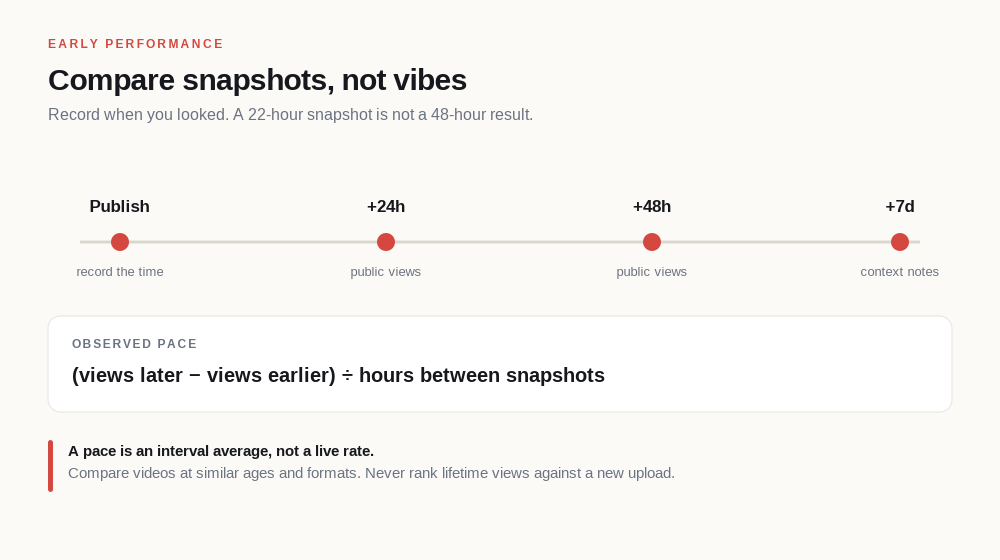
Snapshot at recorded ages, not convenient ones. The formula measures an interval, not a verdict.
#Step 5: Map topics to buyer questions
Group the inventory by the question each video answers, not by keyword. "How to set up competitor tracking in ten minutes" belongs to a setup question, whatever words the title uses. Then count the videos in each question-and-format cell. The crowded cells show where the competitor has already invested. The empty cells are candidates, not opportunities.
A competitor not publishing on a topic is evidence of nothing on its own. The topic may have no demand, may not fit the buyer, or may be hard to explain well. Validate a candidate with a second, independent signal: your own sales calls, support themes, community threads, or search queries in Search Console. Search Console shows what your site was shown for, not the whole market. It is one signal, not a verdict.
The pattern worth owning is usually the second half of a sentence. "How to build a tracker" is covered everywhere. "How to keep it from becoming a graveyard of stale screenshots" is not. The first half earns searches; the second half earns trust. Our guide to content gaps has seven signals and a scorecard for this pass.
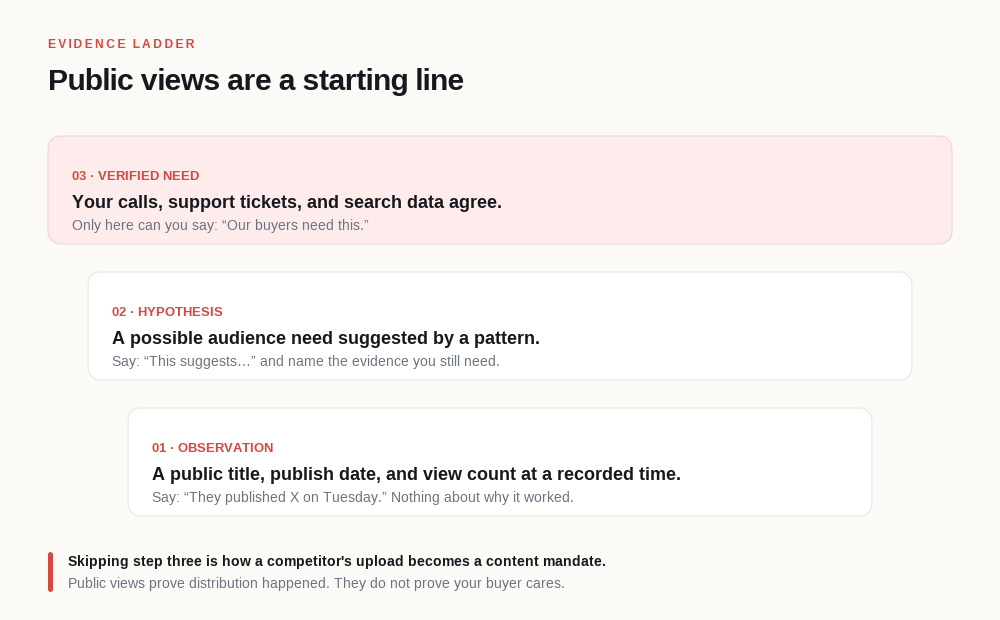
Each step up the ladder buys stronger language. Only the top step supports a content mandate.
#Step 6: Score, choose, and avoid cannibalization
A scorecard does not choose for you. It makes the argument visible. Rate each candidate 1 to 3 on five criteria:
| Criterion | A 3 looks like |
|---|---|
| Audience importance | A question that stalls a deal or an implementation |
| Evidence | Two independent signals agree |
| Distinctiveness | We have the data, the example, or the scar tissue |
| Fit | The answer sits inside our expertise |
| Maintenance cost | The answer survives a product release or two |
Worked example. Candidate A is "YouTube ads for SaaS": importance 3, evidence 2, distinctiveness 1, fit 1, maintenance 2, total 9. Candidate B is "how to compare competitor uploads at similar age": 2, 3, 3, 3, 3, total 14. A has demand and almost nothing else. B is smaller but defensible. Publish B.
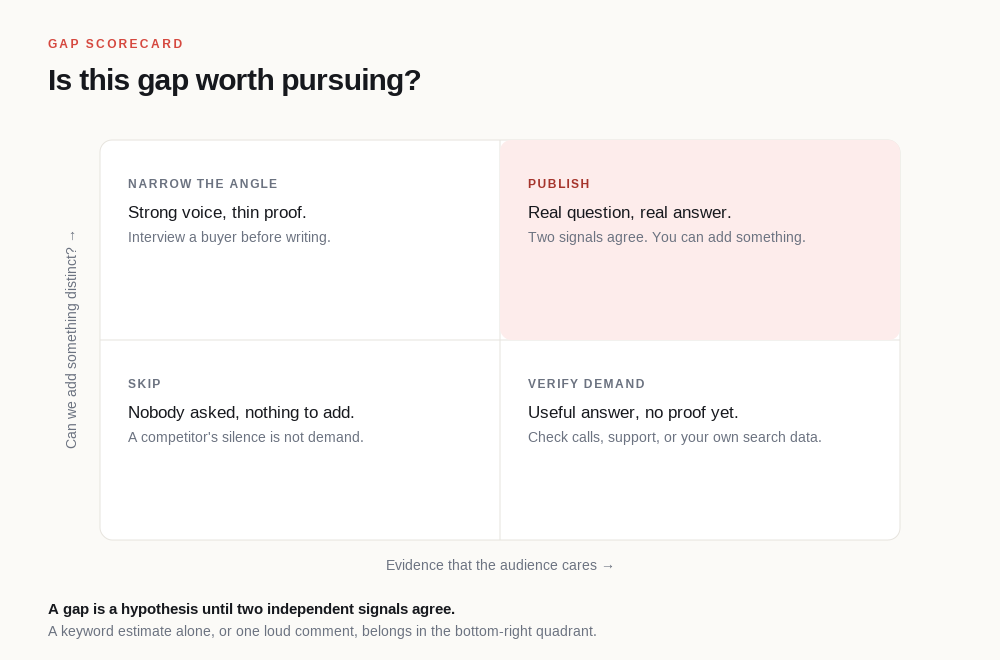
Two axes, four decisions. A competitor's silence alone lands in the bottom-left.
Then apply the cannibalization rules. One primary keyword and one search intent per URL. If two posts target the same intent, merge them and redirect the weaker URL. A pillar owns the head term; supporting articles own the long tail and link back to the pillar. We learned this the expensive way: three overlapping tool-comparison pages became one evaluation guide, and the old URLs now redirect.
#Step 7: Turn the finding into a brief a human can approve
If the candidate survives scoring, write the brief before the outline. It should fit on one page:
- Audience and job: who this is for and what they are trying to decide.
- Question: the one question the piece answers.
- Promise: what the reader can do afterward.
- Thesis: the argument in one sentence.
- Evidence: sources, examples, numbers, and the limits of each.
- What we will not claim: the line that prevents a useful method wrapped in an unsupported promise.
- Original insight: the example, teardown, or point of view that is ours.
- Success metric and reviewer: one name, one date, one way to judge the result.
A brief that does not fit on one page has unresolved arguments. The draft will invent the missing parts, usually in the direction of confidence the evidence cannot support. Our guide to analyzing a single channel includes a one-page teardown template that feeds directly into this brief.
#Step 8: Measure, refresh, and retire
YouTube competitor analysis does not end at publication. Give each piece a review schedule:
- 48 hours: a directional read. Is it being found and clicked?
- 7 days: decide whether a follow-up is justified.
- 28 days: look for durable search traffic and returning viewers.
- 90 days: review the portfolio. Repeat, change, or stop.
Use impressions, click-through rate, and retention from your own channel; use Search Console for search visibility. Treat small samples as inconclusive. Refresh a piece when an interface, policy, or product changes, and mark dated examples clearly. If a piece earns nothing after two review cycles, narrow it, merge it, or retire it. A library is allowed to lose arguments with its audience. It is not allowed to keep publishing the same one.
#Six failure modes, and the fix
Lifetime views as evidence. A video from 2022 with 400,000 views is not a breakout. Compare uploads at a similar age.
Copying the format without the question. A rival's short tutorial worked for their audience. Find the question behind it before you copy the length.
One video as a trend. Six to ten comparable uploads make a baseline. One upload makes a story.
Unlabeled estimates. If a number comes from a model, say so. "Likely high demand" is not a measurement.
Research with no decision. In our experience, this is the most expensive failure. If the analysis ends with a folder rather than a choice, it was entertainment with a spreadsheet.
No named reviewer. A piece nobody owns is a piece nobody will correct. Put a name and a date on it.
#A 30-day plan for a small team
| Week | Work | Output |
|---|---|---|
| 1 | Name one decision, choose three to five channels with a reason for each | One-page decision memo |
| 2 | Build the inventory and the median baseline for each channel | A sheet with definitions and snapshots |
| 3 | Map topics to questions, score candidates, apply cannibalization rules | Ranked candidate list with evidence |
| 4 | Write one approved brief, publish one test, set the review date | A brief and one live piece |
That is enough to learn something. It is deliberately smaller than a full content program. If the test changes one decision, the method earned its keep. If it does not, the problem is rarely the tool.
#FAQ
#What is YouTube competitor analysis?
It is the practice of turning public competitor uploads into defensible content decisions. You collect public fields such as titles, dates, formats, and view counts, compare uploads at a comparable age, map them to buyer questions, and score candidates against your own evidence. Private metrics like retention and click-through rate are not available for someone else's channel.
#Can a tool see a competitor's private analytics?
No, not through public data. Impressions, click-through rate, watch time, retention, and traffic sources require authorization from the channel owner through the YouTube Analytics API. A tool can estimate them, and an estimate can be useful, but a vendor claiming direct access to a rival's private dashboard is overstating what is possible.
#How many competitor channels should we track?
Start with three to five. Include direct alternatives plus one channel competing for the same attention with a different product. Write down why each channel is on the list. Add a channel only when it helps you make a named decision; otherwise it is a bookmark with an invoice.
#How do we compare competitor videos fairly?
Use the same channel, the same format, and a similar age. Record public views at a consistent interval, take the median of six to ten uploads, and compare candidates against that baseline. Never rank a three-year-old video's lifetime views against last week's upload.
#What makes a content gap worth pursuing?
A question your buyer is already asking, an inadequate public answer, and evidence independent of the competitor. If the only signal is that a rival has not covered the topic, keep researching. A topic gap is easy to find; a proof gap is harder and usually more valuable.
#How long does a competitor analysis take?
The first pass takes a few days for a small team: one day to choose channels and decisions, one to build the inventory and baseline, one to map and score, and one to brief. After that, a weekly review of twenty minutes maintains it. If your first pass takes a month, the scope is too large.
The point of YouTube competitor analysis is not to know everything about your competitors. It is to know exactly what you can defend, and to make the next decision with evidence attached. Everything else is a spreadsheet with a nicer font.
Sources
- YouTube Data API: video resource
Documents the public video fields available to an outside observer.
- YouTube Analytics API: reports.query
Shows that impressions, retention, and traffic sources require authorization from the channel owner.
- YouTube Data API: quota costs
Lists per-method quota costs and the default daily allowance, which shape refresh design.
- Google Search Console: Performance report
Explains the queries, impressions, and clicks available for your own verified site.
- Google Search Central: Creating helpful, reliable, people-first content
Google's guidance for judging whether a page helps readers or exists mainly to attract clicks.
- YouTube API Services Terms of Service
Sets the rules for storing, refreshing, and attributing API data.
Written and reviewed by Jean Cope for the ChannelWhisper editorial team. We may mention our own product in articles. Read our research method, disclosure, and corrections policy.
Ready to turn research into pipeline?
ChannelWhisper monitors competitor channels and generates ready-to-record briefs.
Topics
Keep reading
AI Content Checklist: 12 Checks Before You Publish
A printable AI content checklist of twelve checks in four groups, with a one-minute test and a definition of good for each one.
How to Refresh Old Content Without Rewriting It
A decision tree for old pages: keep, update, merge, rewrite in place, or retire — with the history and URLs worth preserving.
Topic Clusters for Small Content Teams
A pillar, six supporting articles, one intent per URL: how a two-person team builds topic clusters that actually get published.