
How to Build a YouTube Content Calendar From Gaps

Turn scored content gaps into a content calendar your team can sustain: real capacity, two weekly slots, named owners, and a weekly review that can say no.

On this page
#The calendar that dies in March
Every January, a content team produces a beautiful content calendar. Twelve weeks, forty-eight slots, a color for every pillar. By March, half the slots are empty and the other half are filled with something that seemed reasonable in December and is now embarrassing.
The problem is not discipline. It is that the calendar was built from a list of topics rather than a measure of capacity. A content calendar is not a wish list with dates. It is a statement of what a team can actually produce and review in a given period, with the gaps between topics made visible.
Build it from scored content gaps, subtract the hours your team really has, and give every slot an owner and a review date. Then the calendar becomes a tool for decisions rather than a source of guilt. Google's helpful content guidance makes the same point from the reader's side: a page should exist to answer a question, not to occupy a slot.
#What a content calendar is actually for
Three jobs, and none of them is "fill every slot":
- Sequence decisions. Some pieces need to come before others. A pillar should exist before its supporting articles link to it.
- Expose capacity. If eight deep articles fit into a four-week window on paper but not in reality, the calendar should show that before anyone starts writing.
- Make skipping visible. Dropping a slot is a decision. Silently letting it pass is not.
A content plan is a list of topics. A publishing log is a record of what happened. A content calendar is a schedule of decisions with an owner attached. Confusing the three is how teams end up with a spreadsheet that nobody opens after the kickoff meeting. We think the most useful calendars are slightly under-filled. A gap in week three is room to learn from weeks one and two.
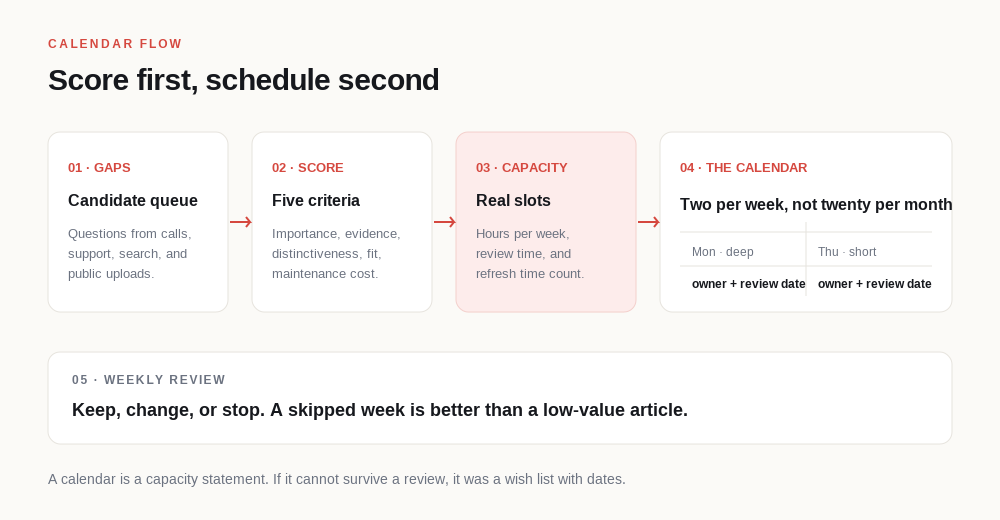
Score first, schedule second. A calendar is a capacity statement, not a list of hopes.
#Step 1: Build a candidate queue, not a topic dump
Start with the output of your gap analysis: questions your buyers are asking, answers that are incomplete, and evidence from calls, support, search, or public competitor uploads.
Evidence can come from calls, support themes, public competitor uploads, and your own Search Console data. Write each candidate as one line with four fields:
| Field | Example |
|---|---|
| Buyer question | "What should we check before migrating a workflow?" |
| Source of evidence | Three support themes plus two sales calls |
| Intended intent | Informational, evaluation, or implementation |
| Format hint | Article, short video, or maintained help page |
Then deduplicate by intent, not by wording. "How to migrate" and "What to check before a migration" may be the same job wearing two hats. If two candidates would fight for the same search intent, merge them. The pillar guide covers the cannibalization rules in detail.
A queue of fifteen candidates is healthy. A queue of eighty is a research project pretending to be a calendar. Cut it before you schedule it.
#Step 2: Score, then cut hard
Rate each candidate 1 to 3 on five criteria: audience importance, evidence, distinctiveness, fit, and maintenance cost. The same scorecard we use for gap decisions works here.
| Criterion | A 3 looks like |
|---|---|
| Audience importance | A question that stalls a decision or an implementation |
| Evidence | Two independent signals agree |
| Distinctiveness | We have the example, the data, or the scar tissue |
| Fit | The answer is inside our expertise |
| Maintenance cost | The answer survives a product release or two |
Sort by total, then draw a line. Eight candidates for a four-week window is plenty. The ones below the line are not bad ideas; they are ideas whose evidence has not arrived yet. Keep them in a backlog with the reason they were cut.
For example, a candidate about "YouTube ads for SaaS" might score high on importance and low on fit and distinctiveness. That is a useful result. It tells you what to gather before revisiting it, rather than letting it occupy a slot it cannot earn.
#Step 3: Count the hours you actually have
This is the step that turns a plan into a calendar.
Suppose two people can spend six hours each per week on content: twelve hours total. Now price the work honestly:
| Work | Realistic hours |
|---|---|
| Deep article or long video, including review | 6 |
| Short piece with one source and one example | 3 |
| Refresh of an existing piece | 2 |
| Weekly review and re-planning | 1 |
Twelve hours minus one hour of review leaves eleven. That is at most one deep piece plus one short piece, with two hours left over for a refresh every other week. Anything more on the calendar is fiction.
In our experience, teams forget two costs: the review time and the refresh time. Both are recurring. A calendar that schedules production but not maintenance produces a library that quietly decays. If a topic changes with the product, schedule its refresh when you schedule its first publication.
#Step 4: Pick a rhythm and fill four weeks
A sustainable default for a small team is one deep piece and one short piece per week. Put them on fixed days. Fixed days matter because a slot without a day is a slot that will be moved forever.
Here is an illustrative four-week calendar:
| Week | Deep slot | Short slot | Owner | Review date |
|---|---|---|---|---|
| 1 | Pillar: competitor analysis guide | How to read a public upload date | Jean Cope | +28 days |
| 2 | Breakout video method | Two-snapshot pace example | Jean Cope | +28 days |
| 3 | From video to brief | Gap scorecard walkthrough | Jean Cope | +28 days |
| 4 | Refresh the comparison page | What we learned from three weeks | Jean Cope | +28 days |
Notice that week 4 includes a refresh and a reflection. That is deliberate. A calendar made entirely of new pieces assumes the existing library is already correct. Usually it is not.
The exact topics matter less than the shape: one substantial decision per week, one smaller supporting piece, one owner, one date when the result will be judged.
#Step 5: Make the brief the entry ticket
A slot is not real until it has an approved brief. The brief should name the audience, the question, the evidence, the limits, and the success metric — on one page, with a reviewer's name and date. Our guide to turning a competitor video into a brief gives the full workflow.
This rule is unpopular because it slows down the first week. It is also the reason later weeks do not stall. A writer who opens a slot and finds only a topic title will spend half their hours reconstructing the argument. That time comes out of production, and the calendar silently breaks.
If a brief is not ready by the Monday of its slot, do not write the piece anyway. Move it to the backlog and use the hours for a refresh. The calendar survived; the schedule changed. Those are different outcomes.
#Step 6: Review weekly, and say no out loud
Twenty minutes a week, same day, same owner:
- What shipped, and did it change a decision?
- Which slot is at risk, and why?
- Did any new evidence promote a backlog candidate?
- Does anything need to be stopped rather than finished?
The fourth question is the one teams avoid. A piece that is technically almost done but targets a question nobody asks is not progress. Stop it, record the reason, and move the hours somewhere useful. A decision log makes this easy to defend later: date, observation, decision, review date.
For performance reviews at 48 hours, seven days, and 28 days, see the SaaS YouTube growth guide. Keep the measurement cadence separate from the production cadence. A video can be published on Thursday and judged three weeks later without anyone's schedule being wrong.
#Five ways calendars go wrong
Filling every slot. A full calendar looks committed and behaves like a deadline machine. Under-fill it by one slot a month and use the room to learn.
Scheduling production without maintenance. Anything that changes with a product or policy needs a refresh slot. Otherwise the library rots on schedule.
Topic-only entries. "Write about migration" is not a slot. It has no audience, question, or evidence. Make the brief the entry ticket.
No owner. A slot owned by "the team" belongs to nobody. One name per slot, even if that person only coordinates it.
No kill criteria. Decide in advance what would make you stop a piece: no independent evidence, no distinct angle, or a reviewer who cannot say what problem it solves.
#FAQ
#How far ahead should a content calendar plan?
Four weeks is enough for a small team. Longer horizons create the illusion of certainty: product changes, customer questions, and search data will all move within a quarter. Keep a scored backlog for later weeks and pull from it during the weekly review.
#How many articles per week is realistic?
For two people with about twelve content hours a week, one deep piece and one short piece is realistic, provided you reserve time for review and refresh. A team with fewer hours should publish less often. A calendar that assumes unlimited evenings is not a plan.
#Should a content calendar include refreshes?
Yes. Schedule refresh time when you schedule the original piece. Anything tied to an interface, a policy, or a product release will drift. A calendar with only new articles is a calendar that guarantees future cleanup work.
#What do I do when a slot is missed?
Move it to the backlog with a reason and use the hours for a refresh or the highest-scoring candidate that is actually ready. Do not publish a weak piece to protect a streak. A skipped slot is information; an unsupported article is a liability.
#Who owns the content calendar?
One person coordinates it, and each slot has its own named owner. The coordinator protects capacity, keeps the backlog scored, and runs the weekly review. The slot owner is responsible for the brief and the final piece.
The best content calendar is the one your team still uses in month three. Build it from scored gaps, size it to real hours, and leave enough space to change your mind.
Sources
- Google Search Console: Performance report
A source of independent demand evidence for the candidate queue.
- Google Search Central: Creating helpful, reliable, people-first content
Supports the rule that slots should answer real questions rather than fill a schedule.
- YouTube Data API: video resource
Documents the public fields used when competitor uploads inform gap candidates.
Written and reviewed by Jean Cope for the ChannelWhisper editorial team. We may mention our own product in articles. Read our research method, disclosure, and corrections policy.
Ready to turn research into pipeline?
ChannelWhisper monitors competitor channels and generates ready-to-record briefs.
Keep reading
AI Content Checklist: 12 Checks Before You Publish
A printable AI content checklist of twelve checks in four groups, with a one-minute test and a definition of good for each one.
How to Refresh Old Content Without Rewriting It
A decision tree for old pages: keep, update, merge, rewrite in place, or retire — with the history and URLs worth preserving.
Topic Clusters for Small Content Teams
A pillar, six supporting articles, one intent per URL: how a two-person team builds topic clusters that actually get published.