
YouTube SEO for B2B: Titles, Descriptions, and Chapters

Make your videos findable for the right buyer: buyer-language titles, useful descriptions, decision-style chapters, and captions you can trust.

On this page
#The description that reads like a keyword landfill
Search "youtube seo" and you will find advice to write five-hundred-word descriptions, repeat your keyword eight times, and stuff a tag cloud with every variation of "marketing." Most of it was written for a different era, and most of it makes a B2B channel worse.
For a B2B team, YouTube SEO is a narrower job: make it easy for the right person to find the right video and understand what it covers before they press play. The audience is small, the questions are specific, and a vague ranking is worse than no ranking. Optimizing for "marketing" brings an audience that will never buy. Optimizing for "how to compare two approval workflow approaches" brings someone with a decision to make.
This guide covers the four surfaces that do the work — title, thumbnail, description, and chapters — plus captions, which quietly affect both accessibility and discovery. Each has a limit. None of them rescues a video that answers the wrong question.
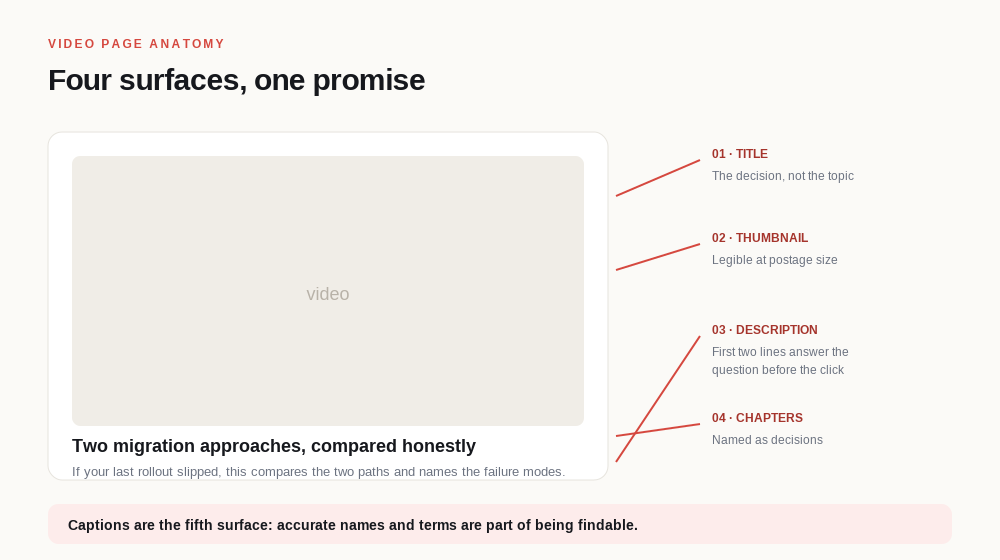
Four surfaces, one promise. The metadata should describe the decision, not decorate the upload.
#What YouTube SEO means for B2B
Search volume is a weak guide when your total addressable audience fits in a conference room. A keyword with 50 monthly searches can be a better target than one with 50,000 if the 50 are the people who sign contracts.
Start with the language buyers use in calls, support tickets, and sales objections. Then check how those questions are phrased in public video titles and in your own site's search data. Search Console shows the queries your site already appears for; it does not show the whole market. YouTube's own reports can show search terms that brought viewers to your videos, available through the Analytics API for your authorized channel. Neither source tells you what a competitor's rankings are.
The goal is not to win a head term. It is to be the best answer to a narrow question at the moment someone asks it. If that sounds familiar, it is the same principle behind our content gap method: validate the question before you optimize the packaging.
#1. The title: name the decision
A title has one job: tell the right viewer that this video resolves their specific problem. Topic titles are vague. Decision titles are specific.
| Weak | Better |
|---|---|
| Workflow automation tips | Two approval workflows, compared honestly |
| CRM guide for SaaS | What to check before you migrate a CRM workflow |
| YouTube growth | How to compare competitor uploads at the same age |
The better versions are not longer for the sake of it. They name a situation and a promise. They also avoid the two classic failures: clickbait that the video cannot pay, and internal jargon the buyer never says.
Put the buyer's language near the front. If your audience says "migration" and your product team says "data transition," use "migration" in the title. You can educate them on your preferred terminology inside the video.
Do not stuff the keyword. A title that reads like a search query is a title nobody wants to click. YouTube SEO works when a human and a search system can agree that the title describes the video.
#2. The thumbnail: keep the promise legible
The thumbnail is not technically a text field, but it is part of the same promise. A viewer sees it next to the title, and the two must tell one coherent story.
Three rules are enough for a B2B channel: make the main shape readable at postage-stamp size, use no more than a few words, and avoid a different promise from the title. A face, a diagram, or a before-and-after can all work. Ten tiny labels cannot.
Consistency helps more than novelty. If every video in a series uses the same visual structure, returning viewers recognize the series before they read the title. That is a small but real discovery advantage for a narrow audience.
#3. The description: answer the question in the first two lines
Most viewers see the first two lines of a description before they click "more." Write for that surface first.
A useful structure:
- Line one: the question the video answers, in the viewer's words.
- Line two: what they will be able to do afterward, plus who it is for.
- Evidence: links to the docs, data, or source material the video uses.
- Chapters: timestamps with decision-style labels.
- Next step: one relevant resource, not five.
For example, an implementation video might open with: "What should you check before migrating an approval workflow? This walkthrough covers decision rights, exception paths, and the two failure modes we see most in regulated teams." That gives a viewer enough information to decide without watching, which is exactly the point.
What to leave out: keyword lists, fifty hashtags, and a paragraph about your company's mission. A description is support material for the video, not a separate landing page competing with it. If a claim in the video needs a source, link the source. If it needs a disclosure, put the disclosure where a reader can see it. Our editorial policy describes the standard.
#4. Chapters: turn timestamps into decisions
Chapters let viewers jump to the part they need, and they give search systems a structural reading of the video. YouTube's own video chapters help covers the timestamp format and the rules for when chapters appear.
The format is easy. The labels are the part that takes thought. "Introduction," "Demo," and "Conclusion" are not useful chapters. Name the decision:
- 00:00 Who this is for
- 01:20 The two approaches
- 04:10 What breaks in each one
- 08:35 How to choose
Four chapters with decision labels tell a viewer the video respects their time. They also create a natural outline you can reuse for the accompanying article, which is how a content brief should be built in the first place.
Chapters have limits. They do not fix a video with no structure, and they will not rescue a title that promises the wrong thing. Add them after the content is right.
#5. Captions: the quiet surface
Auto-generated captions are a starting point, not a finished product. Product names, competitor names, and technical terms are routinely misheard. For a B2B video, a caption that turns your product into a nonsense word is both an accessibility problem and a discovery problem.
YouTube's subtitles and captions help explains how to upload or edit them. Check proper nouns, acronyms, and any number that matters. If you mention a metric, make sure the caption shows the right one.
This is unglamorous work and it compounds. Accurate captions help viewers who watch muted, viewers who are deaf or hard of hearing, and search systems trying to understand what the video says. There is no downside except the ten minutes it takes.
#A twenty-minute optimization pass
You do not need to re-record anything to improve an existing video. Work in this order:
- 0–4 minutes: read the title aloud. Does it name a decision in the buyer's language? Rewrite if not.
- 4–8 minutes: look at the thumbnail at actual feed size. Is the main idea legible? Does it match the title?
- 8–14 minutes: rewrite the first two description lines and link the sources the video actually used.
- 14–18 minutes: replace generic chapter labels with decisions.
- 18–20 minutes: check captions for product names, acronyms, and numbers.
Then leave it alone for 28 days. Changing metadata every week destroys your ability to tell what worked. For the review cadence and the metrics to watch, see the analytics guide and the SaaS growth guide.
#Five mistakes worth avoiding
Writing for volume instead of fit. A high-volume term brings a broad audience that will never buy. Choose the narrow question.
Keyword soup in the description. Repetition does not add clarity. It makes the description harder to read and the brand harder to trust.
Chapters that describe structure rather than decisions. "Part two" tells a viewer nothing. "What breaks in each approach" tells them whether to stay.
Trusting auto-captions with technical terms. Check them. Ten minutes of editing prevents a wrong word from becoming part of the record.
Optimizing before the content is right. Metadata amplifies a video; it does not repair one. If the answer is thin, write a better answer before you rewrite the title.
#FAQ
#What is YouTube SEO for B2B?
It is the practice of making a video easy to find and understand for a narrow professional audience. It means using buyer language in titles, writing descriptions that answer a question in the first two lines, adding decision-style chapters, and checking captions. It is not keyword stuffing or chasing the highest-volume term.
#Do hashtags help YouTube SEO?
A few relevant hashtags can help categorization, but lists of twenty or more add noise. For B2B channels, two or three accurate tags are plenty. Spend the saved time on the title and the first two description lines, which viewers actually read.
#How long should a YouTube description be?
As long as it takes to answer the question and link the evidence. There is no magic length. The first two lines carry most of the weight because they appear before the viewer expands the description. Everything after that should support the video, not compete with it.
#Do chapters improve rankings?
Chapters help viewers navigate and give search systems a clearer structure to read. They are not a ranking trick, and they do not rescue a video with no real structure. Use them when they reflect decisions a viewer might want to jump to.
#Can I see a competitor's YouTube keywords?
Not directly. Public data shows titles, descriptions, dates, and public engagement. It does not show the search terms that brought a rival views, or their click-through and retention data. Treat their titles as evidence of positioning, not as a keyword report. Our competitor research guide explains the boundary.
The point of optimizing a video is to make an honest promise that the right person can find. If the promise and the content agree, the rest is maintenance.
Sources
- YouTube Help: Video chapters
Documents the timestamp format and rules for chapter markers.
- YouTube Help: Add subtitles and captions
Explains how to add and edit captions, including accuracy considerations.
- YouTube Analytics API: reports.query
Documents the authorized reports that can show search terms for your own channel.
- Google Search Console: Performance report
Shows queries for your own site, used as one input to question selection.
Written and reviewed by Jean Cope for the ChannelWhisper editorial team. We may mention our own product in articles. Read our research method, disclosure, and corrections policy.
Ready to turn research into pipeline?
ChannelWhisper monitors competitor channels and generates ready-to-record briefs.
Keep reading
AI Content Checklist: 12 Checks Before You Publish
A printable AI content checklist of twelve checks in four groups, with a one-minute test and a definition of good for each one.
How to Refresh Old Content Without Rewriting It
A decision tree for old pages: keep, update, merge, rewrite in place, or retire — with the history and URLs worth preserving.
Topic Clusters for Small Content Teams
A pillar, six supporting articles, one intent per URL: how a two-person team builds topic clusters that actually get published.