
Why Most B2B YouTube Channels Look Like Webinars With Better Thumbnails

Six B2B YouTube mistakes that have nothing to do with budget: recording meetings, letting calendars think, hiding failure modes, and never retiring anything.

On this page
#The video that is really a meeting
You know the video. It is one of the classic B2B YouTube mistakes. It is forty-two minutes long. A person in a square in the corner reads slides that were clearly written for a room. At 41:30, someone asks "any questions?" into a silence that no webinar has ever actually contained. The thumbnail has been replaced with a bolder font, which is the entire repurposing strategy.
The channel has twelve videos like this. They are not terrible. They are simply meetings with better branding, and the audience can tell within nine seconds.
These B2B YouTube mistakes are rarely about budget or equipment. They are about treating a video as a container for content rather than an answer to a question. Here are the six we see most, and what to do instead.
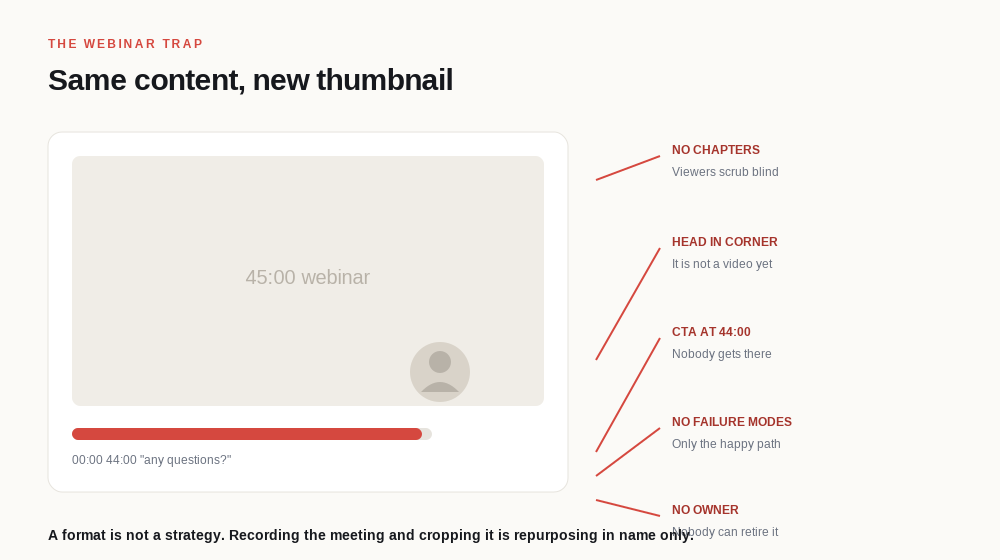
Same content, new thumbnail. A format is not a strategy.
#The B2B YouTube mistakes we see most
#1. Recording the meeting and cropping it
A webinar is a live event with a clock, a moderator, and an audience that signed up. A video is a searchable answer that someone finds alone, often with a problem, usually in a hurry. Those are different jobs. Uploading the recording and adding chapters does not convert one into the other.
For example, the tell is structural: no clear question in the first thirty seconds, a call to action parked at minute forty-four that nobody hears, and no segment a viewer could jump to if they only needed one thing. A viewer with a specific problem does not want the whole meeting. They want the four minutes that solve it.
Fix: start from the question, then decide whether the answer needs a six-minute walkthrough or a forty-minute deep dive. Most of the time it needs six minutes. If you must use the webinar, cut it into three answers with three titles and three owners.
#2. Letting the calendar do the thinking
The second mistake arrives as a spreadsheet. Twelve weeks, forty-eight slots, a color for every pillar. It looks like commitment. It is actually a plan that has answered "when?" before answering "why?"
A calendar built from topics rather than decisions produces content that is consistently published and consistently ignored. The team hits its cadence, the dashboard goes green, and nobody can name a decision the channel changed. Our content calendar guide starts from capacity and scored gaps for exactly this reason.
Fix: make the brief the entry ticket. If a slot has no named buyer, question, and evidence, leave it empty. An empty slot is an honest piece of information. A filled slot with no argument is a debt you will pay later.
#3. Showing only the happy path
B2B buyers are not naïve. They have been burned by implementations that looked smooth in a demo and turned into a six-week incident. A video that shows only the successful path confirms their suspicion that you are selling, not helping.
The missing material is almost always the same: what breaks, what you need before you start, what the exceptions look like, and how to tell whether the approach applies to you. Those are the parts a buyer screenshots and sends to a colleague. They are also the parts teams are most reluctant to publish, because admitting that a process has failure modes feels like admitting weakness. It is the opposite. A documented failure mode is a credibility deposit.
Fix: before you publish, write down what could go wrong and make sure the video says something true about it. If nothing can go wrong, the topic is probably too shallow to matter.
#4. Using one metric for four different jobs
A channel full of tutorials, comparisons, and customer evidence gets judged by a single number: views. The tutorials get compared with the thought-leadership piece, the short gets compared with the webinar, and everyone concludes that the short is "performing" because it has more views. It was nineteen seconds long. Of course it has more views.
A view is a distribution outcome, not a verdict on strategy. Our analytics guide maps the metrics to the questions they answer; the strategy pillar sets different success criteria for different jobs. Evaluation content should be judged on click-through and what happens next. Implementation content should be judged on completion and support deflection. A point of view should be judged on the quality of the conversation it starts.
Fix: write the success criterion in the brief, before the upload. If the team cannot say what a good result looks like for this specific piece, the piece is not ready.
#5. Talking about the product before the problem
Some channels open every video with the company, the platform, and a tour of the dashboard. This is understandable. It is also a brochure with a play button, and brochures do not build trust with people who have not yet admitted they have a problem.
The buyer's first question is never "tell me about your product." It is "is this the problem I have, and who else like me has solved it?" Product belongs in the answer, especially when it is genuinely part of the method, but it belongs after the question is named and before the viewer is asked to do anything. Our editorial policy says the same thing in fewer words: if a page does not help the reader make a decision, it does not belong here.
Fix: in the first thirty seconds, name the viewer and the question. Mention the product when it would be dishonest not to. Disclose the relationship and move on.
#6. Never retiring anything
B2B YouTube channels accumulate old videos the way closets accumulate coats. Nothing gets thrown away because somebody might need it someday, and nobody wants the awkward conversation about why a video from 2022 still describes the old interface.
A library that never loses an argument becomes a museum of previous strategies. New viewers find the outdated piece first, because it had two years to accumulate views. Then they decide the company is behind the times. In our experience, this is the mistake teams notice last. YouTube's public Data API shows titles and publication dates but cannot tell you whether anyone still needs a video; Google's helpful content guidance makes the broader point. Our competitor analysis guide applies the same standard to other people's catalogs: lifetime views are not evidence that the content is still useful.
Fix: schedule a 90-day review. Narrow, merge, refresh, or retire. retirement is not failure. It is maintenance, and it is much cheaper than explaining an obsolete screenshot in a sales call.
#What to do instead
The B2B YouTube mistakes above share one root cause: the decision came after the production. Five lines, and none of them require a bigger budget:
- Name one buyer decision before you name a topic.
- Start from the question, not the meeting you already recorded.
- Show the failure modes; they are the credibility deposit.
- Set one success criterion per piece, in the brief.
- Put a name, a review date, and an exit condition on every video.
If you can do those five things, the thumbnails will take care of themselves.
#FAQ
#Why do B2B YouTube videos feel like webinars?
Because many of them are webinars. A recording made for a live room has a clock, a moderator, and a captive audience. A video has none of those. It needs a clear question early, a structure a viewer can navigate, and an answer that works without the room.
#How long should a B2B YouTube video be?
As long as the decision requires. A single comparison can be six minutes; a complex implementation might need twenty. Length is not the mistake. The mistake is making a forty-minute video because the meeting happened to be forty minutes.
#Should we show product failures in a video?
Show the failure modes of the process, not a manufactured product confession. What breaks, what to check first, and where the approach does not apply are useful and honest. A fabricated failure story is not. The standard is whether the detail helps a viewer make a decision.
#How do we know if a video is working?
Decide before you publish. Judge a tutorial on completion and follow-up actions, a comparison on click-through and movement to the next page, and an opinion piece on the conversation it starts. Comparing all videos on raw views will always crown the shortest one.
#What should we do with old videos that are out of date?
Refresh, merge, or retire them at a 90-day review. If the interface changed, update the footage. If another video answers the question better, redirect attention to it. Keeping an obsolete video because it once did well is nostalgia with hosting costs.
Most B2B YouTube mistakes are decision problems wearing a camera. Fix the decision and the video gets easier to make — and considerably easier to watch. Fix the decision and the video gets easier to make — and considerably easier to watch.
Sources
- Google Search Central: Creating helpful, reliable, people-first content
External standard for whether a page helps a reader or merely fills a slot.
- YouTube Data API: video resource
Documents the public fields that inform a catalog review.
- YouTube Analytics API: reports.query
Documents the authorized metrics available when judging a video's result.
Written and reviewed by Jean Cope for the ChannelWhisper editorial team. We may mention our own product in articles. Read our research method, disclosure, and corrections policy.
Ready to turn research into pipeline?
ChannelWhisper monitors competitor channels and generates ready-to-record briefs.
Keep reading
AI Content Checklist: 12 Checks Before You Publish
A printable AI content checklist of twelve checks in four groups, with a one-minute test and a definition of good for each one.
How to Refresh Old Content Without Rewriting It
A decision tree for old pages: keep, update, merge, rewrite in place, or retire — with the history and URLs worth preserving.
Topic Clusters for Small Content Teams
A pillar, six supporting articles, one intent per URL: how a two-person team builds topic clusters that actually get published.